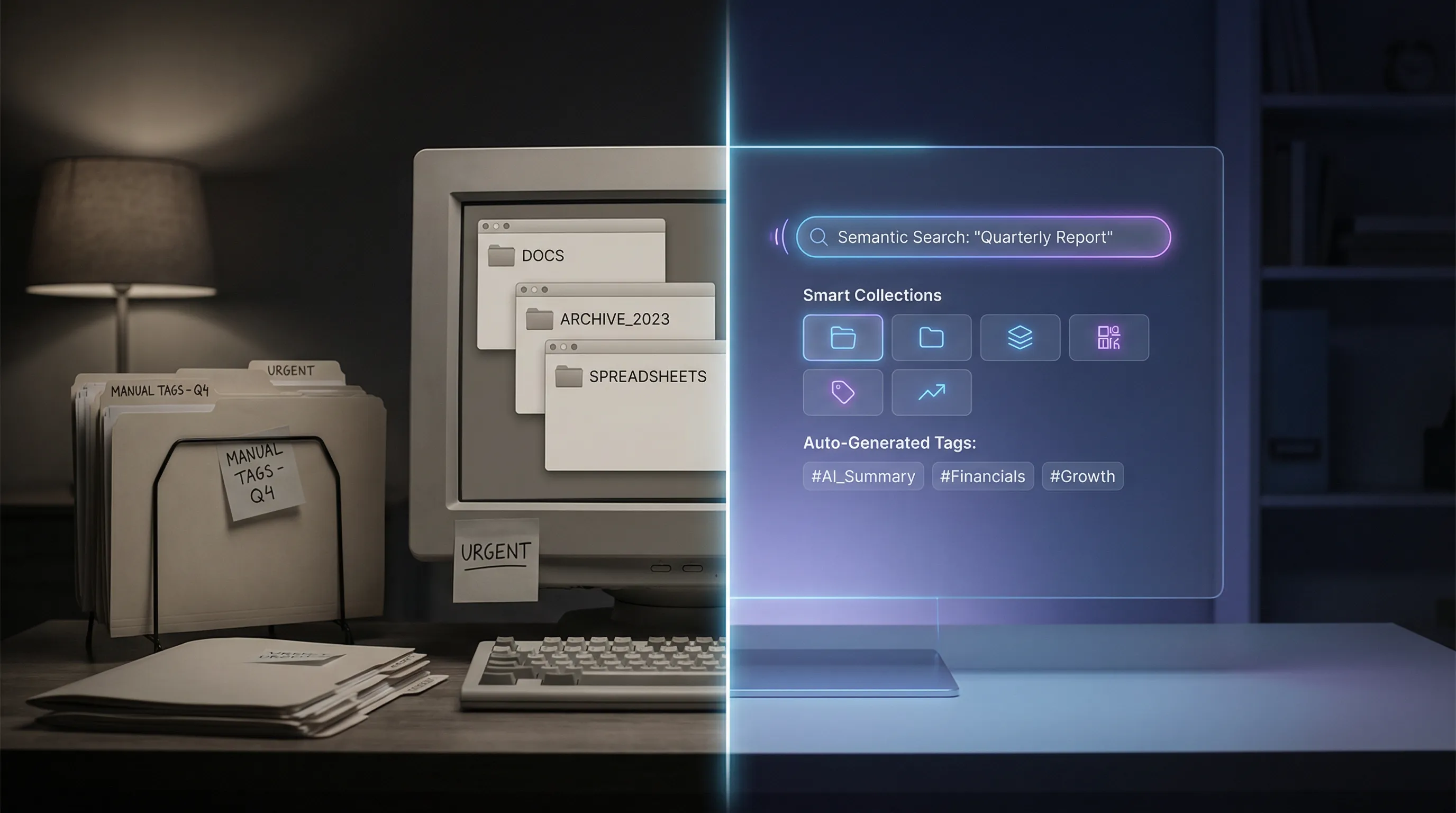
Legacy DAM vs AI-Native DAM: What's the Real Difference?
Digital Asset Management has been around for decades. The first DAM systems emerged in the 1990s to help publishers and media companies catalog and retrieve digital files. Since then, the category has expanded to serve marketing teams, brand managers, creative agencies, and enterprise organizations of all kinds.
But the DAM landscape in 2025 is not monolithic. A fundamental divide has emerged between two types of platforms: legacy DAM systems that have added AI features over time, and AI-native DAM platforms that were built from the ground up with artificial intelligence at their core.
This is not a minor distinction. It affects every aspect of the user experience, from how assets are ingested and organized to how teams search, collaborate, and extract value from their content. Understanding this difference is essential for any organization evaluating its video management strategy.
What Is a Legacy DAM?
Legacy DAM systems are platforms that were designed and built before the current generation of AI technologies matured. Their core architecture, data models, user interfaces, and workflow logic were created for a world where metadata was entered manually, search meant keyword matching, and organization depended on human-created folder structures and taxonomies.
Many of these platforms are well-established and widely used. They have loyal customer bases, extensive feature sets, and years of development behind them. Recognizable names in this category include platforms that have been serving the market for ten, fifteen, or even twenty years.
In recent years, most legacy DAM vendors have added AI-powered features to their platforms. These additions typically include automated tagging, facial recognition, basic transcription, and improved search. The marketing materials make them sound comparable to newer platforms. But the underlying reality is more nuanced.
What Is an AI-Native DAM?
An AI-native DAM is a platform that was conceived and designed with AI as a foundational element, not an add-on. The architecture, data model, user experience, and workflow logic all assume that AI will be processing, analyzing, and enriching every asset that enters the system.
WIKIO AI is an example of this approach. Rather than retrofitting AI capabilities onto an existing product, WIKIO AI was built from the start around the premise that every video should be automatically transcribed, indexed, tagged, and made searchable the moment it is uploaded. The entire user experience is designed around this assumption.
The distinction between these two approaches may seem academic, but it has profound practical implications.
The Architectural Difference
Data Model
Legacy DAM systems typically organize assets using a hierarchical data model: folders, subfolders, and metadata fields that were defined when the system was first configured. Adding new types of metadata, especially the rich, multidimensional metadata that AI generates, often requires schema changes, custom fields, and configuration work.
AI-native platforms use flexible, graph-based or document-based data models that can accommodate any type of metadata without schema changes. When the AI identifies a new type of information in a video, such as a specific product, a location, or a topic, that information is immediately incorporated into the asset's profile and made searchable. No configuration required.
Processing Pipeline
In a legacy DAM, asset processing is typically linear: upload, store, and display. AI features are bolted onto this pipeline as additional steps. A video might be uploaded, stored, and then queued for AI processing that happens asynchronously, sometimes with significant delays.
In an AI-native platform, processing is parallel and immediate. Upload triggers simultaneous transcription, visual analysis, tagging, indexing, and any other AI-powered processing. By the time a user navigates to the newly uploaded asset, it is already fully processed and searchable.
Search Infrastructure
Legacy DAM search is typically built on traditional database queries and keyword matching. Even when AI-powered search is added, it often operates as a separate search mode or overlay rather than a fundamental reimagining of how search works.
AI-native search uses vector embeddings, semantic understanding, and natural language processing as its primary search mechanism. Users do not need to know the exact tag or keyword to find an asset. They can describe what they are looking for in natural language, and the system understands intent, synonyms, and context.
The User Experience Difference
Onboarding and Setup
Legacy DAM systems often require extensive configuration before they are useful. Administrators must define folder structures, create metadata schemas, establish naming conventions, configure user permissions, and set up workflows. This process can take weeks or months for large organizations.
AI-native platforms aim for a radically simpler onboarding experience. Because the AI handles categorization, tagging, and organization automatically, teams can start uploading content immediately and begin working productively on the same day. WIKIO AI, for instance, requires minimal configuration to deliver a fully functional, searchable video library.
Daily Workflow
In a legacy DAM, users spend a significant portion of their time on organizational tasks: tagging assets, moving files to the right folders, filling in metadata fields, and maintaining the structural integrity of the library. These tasks are necessary because the system depends on human-created organization to function effectively.
In an AI-native DAM, these tasks are largely automated. Users spend their time on creative and strategic work: finding the right content, collaborating with team members, and making decisions. The organizational burden shifts from people to machines.
Search and Discovery
This is where the difference is most visible. In a legacy DAM, finding a specific video clip typically involves:
- Navigating folder hierarchies
- Applying filters based on metadata fields
- Scanning thumbnails and filenames
- Opening multiple candidates to check if they match
- Repeating the process if the first attempts fail
In an AI-native DAM, the same task looks like:
- Type a natural language query: "product demo at the Berlin conference, the part where Sarah explains the new dashboard"
- Review the results, which include exact timestamps within videos where the matching content appears
- Click to play from the relevant moment
The difference in time and cognitive effort is dramatic. For teams that search for content multiple times per day, this efficiency gain compounds significantly over time.
Collaboration
Legacy DAM systems were originally designed for asset storage and retrieval, not collaboration. Review and approval workflows, when they exist, are often rigid and limited. Commenting capabilities may be basic, and real-time collaboration is rare.
AI-native platforms are built for modern, distributed teams. WIKIO AI, for example, provides timestamped commenting on video content, allowing reviewers to leave feedback tied to specific moments in a video. AI can summarize feedback threads, highlight areas of consensus and disagreement, and suggest next steps based on review patterns.
The Cost Difference
Total Cost of Ownership
Legacy DAM systems often have lower sticker prices for their base platform, but the total cost of ownership can be significantly higher when you account for:
- Configuration and customization costs during implementation
- Manual metadata entry labor ongoing
- Training for complex interfaces
- Integration development to connect with modern tools
- Maintenance and upgrades to keep pace with evolving requirements
AI-native platforms typically have higher per-seat or per-storage-unit pricing, but they eliminate or dramatically reduce the costs of manual metadata management, complex configuration, and ongoing maintenance. The net result is often a lower total cost of ownership, especially for video-heavy organizations.
Opportunity Cost
Perhaps more importantly, legacy systems carry a significant opportunity cost. Every hour a team member spends manually tagging videos, searching through folder hierarchies, or managing cumbersome review workflows is an hour not spent on creative work, strategic planning, or content production. AI-native platforms reclaim these hours.
When Legacy DAM Still Makes Sense
It is worth acknowledging that legacy DAM systems are not universally inferior. They may be the right choice for organizations that:
- Primarily manage static assets (images, documents, brand files) rather than video
- Have already invested heavily in a legacy platform and built extensive integrations around it
- Operate in highly regulated environments where changing platforms involves significant compliance work
- Have relatively small libraries that do not require advanced search and automation
However, for organizations where video is a primary or growing asset type, where teams are distributed, where content volume is increasing, and where speed and discoverability are competitive advantages, the AI-native approach delivers substantially more value.
What to Look for When Evaluating
If you are in the market for a video management platform, here are the questions that will help you distinguish between legacy and AI-native approaches:
Is AI processing automatic or opt-in? In an AI-native platform, every asset is processed by AI by default. If AI features require manual activation or are limited to certain asset types, that is a legacy indicator.
How does search work? Ask for a live demonstration. Can you search using natural language? Can you search within video content (transcripts, visual elements)? How quickly are results returned?
What happens at upload? Upload a video during your evaluation. How long before it is fully transcribed, tagged, and searchable? Minutes suggest AI-native. Hours or manual steps suggest legacy.
How flexible is the metadata model? Can the system accommodate new types of metadata without administrative configuration? AI-native platforms handle this dynamically.
What does collaboration look like? Can reviewers comment on specific moments in a video? Is feedback integrated into the platform or does it happen in external tools?
How are integrations handled? Does the platform offer modern APIs and native integrations with the tools your team uses? Legacy platforms may rely on older integration methods that require custom development.
The Verdict
The distinction between legacy DAM and AI-native DAM is not about age or brand recognition. It is about architecture, philosophy, and the fundamental assumptions that shaped how the platform was built.
Legacy platforms were built for a world where humans organized assets and computers stored them. AI-native platforms were built for a world where AI organizes assets and humans focus on using them creatively and strategically.
For video teams operating at scale in 2025 and beyond, the AI-native approach is not just a preference. It is increasingly a competitive necessity. The volume of video content is growing too fast, teams are too distributed, and the cost of manual organization is too high for legacy approaches to keep pace.
WIKIO AI represents this new generation of video management: purpose-built for AI, designed for collaboration, and engineered to make every video in your library discoverable, usable, and valuable from the moment it is uploaded.
The real difference is not a feature list. It is a fundamentally different way of thinking about what a video management platform should do.